
close-button
  • images resizers in inches
  • images resizers in pixel
    OTHER TOOLS
  • Image Tools
    OTHER TOOLS
  • Social & Design Tools
  • Adjust Tools
  • Png Tools
  • Animation Tools
  • Border Tools
  • Base64 Tools
  • Filter Tools
  • Effect Tools
  • Jpg Tools
  • Gif Tools
  • Chart tools
  • Calculators
  • Social Media Tools
  • Resize photos to 1200 × 675 pixels

    Create perfectly sized 1200 × 675 pixel images instantly

    Upload Image
    googledrive dropbox
    or
    drag and drop here
    Resize Images to 1200 × 675 Pixel Resolution

    Resize Images to 1200 × 675 Pixel Resolution

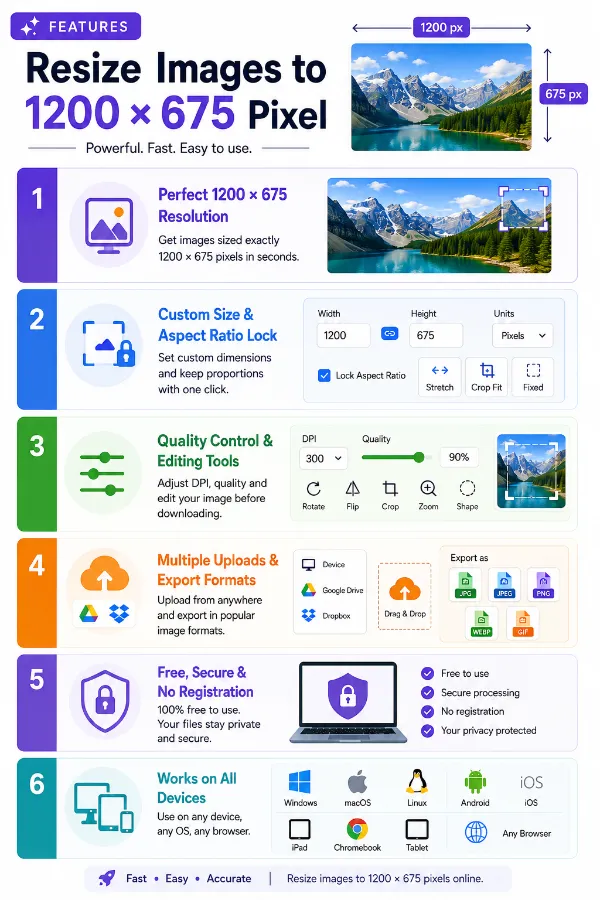
    Create perfectly sized 1200 × 675 pixel images in seconds without manually calculating width and height, making it suitable for widescreen website graphics, featured images, presentations, and other digital layouts that require this proportion. Simply upload your image and download an accurately resized version ready to use.

    Custom Dimensions and Aspect Ratio Lock

    Custom Dimensions and Aspect Ratio Lock

    Keep the default 1200 × 675 pixel size, or enter custom dimensions using pixels, inches, centimeters, or millimeters whenever your project requires a different size. Enable Lock Aspect Ratio to automatically maintain the original image proportions and prevent unwanted stretching. You can also choose Stretch, Crop Fit, or Fixed mode to control how the final image is resized.

    Control Image Quality with DPI and Editing Tools

    Control Image Quality with DPI and Editing Tools

    Prepare images for both digital and print projects by adjusting the DPI and image quality before downloading. Rotate, flip, zoom, change the image shape, and preview your edits before downloading. These built-in options help you fine-tune your image while keeping the resizing process fast and convenient.

    Multiple Upload Options with Flexible Export Formats

    Multiple Upload Options with Flexible Export Formats

    Import images from your device, Google Drive, or Dropbox, or simply drag and drop files into the upload area. After resizing, download your image in JPG, JPEG, PNG, WEBP, or GIF, making it compatible with websites, presentations, social media, documents, and digital publishing platforms.

    Free, Secure, and No Registration Required

    Free, Secure, and No Registration Required

    Resize images online without creating an account or installing software. Your files are processed securely, helping protect your privacy throughout the resizing process while allowing you to generate accurately resized images quickly and at no cost.

    Works Across Devices and Operating Systems

    Works Across Devices and Operating Systems

    Access the image resizer from Windows, macOS, Linux, Android, iPhone, iPad, Chromebooks, and tablets using any modern web browser. Whether you're working at home, in the office, or on the go, you can resize images anytime without device restrictions.
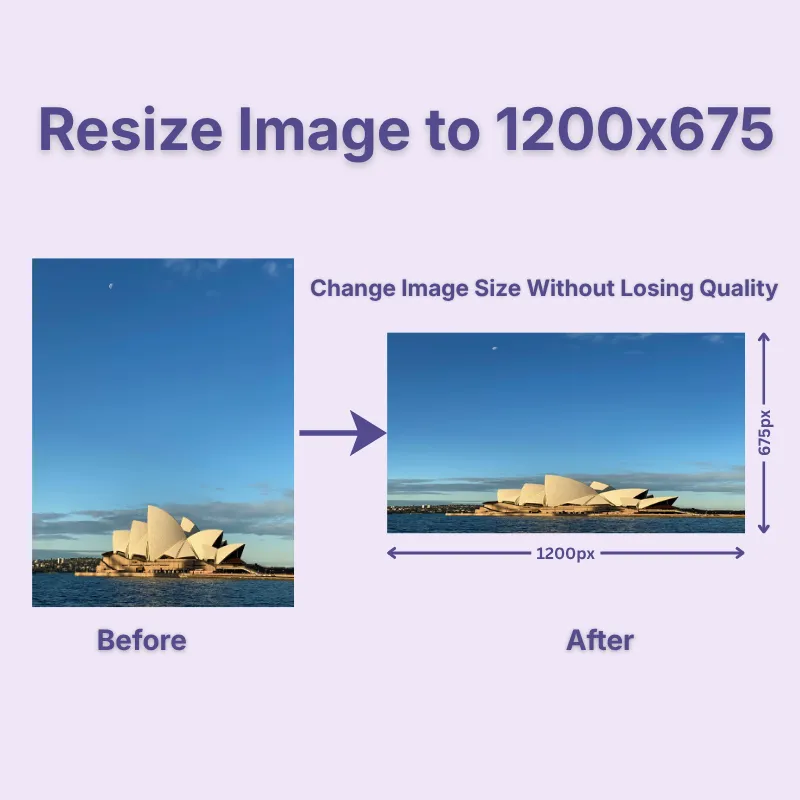
    1200x675

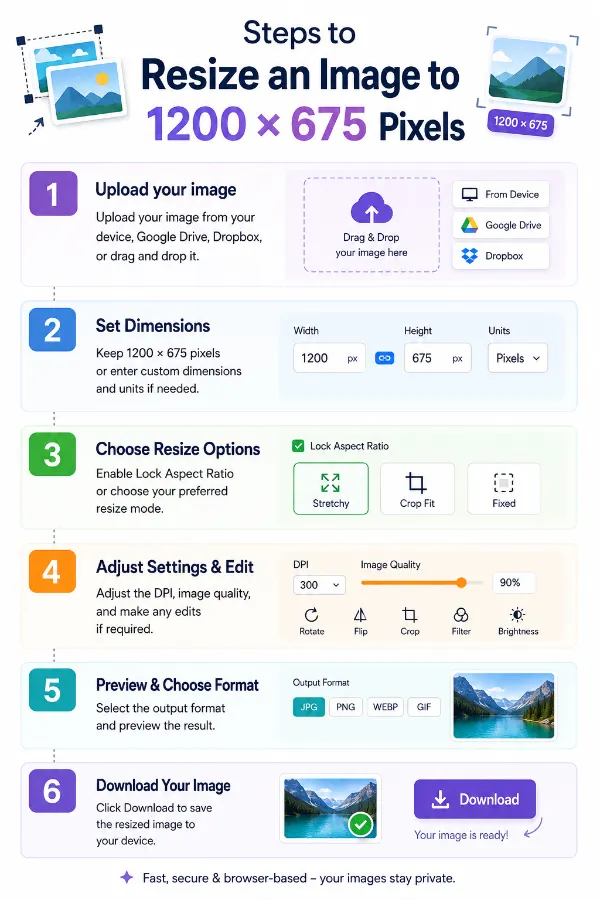
    Steps to Resize an Image to 1200 × 675 Pixels

    1 . Upload your image from your device, Google Drive, or Dropbox or drag and drop it.
    2 . Keep 1200 × 675 pixels or enter custom dimensions and units if needed.
    3 . Enable Lock Aspect Ratio or choose your preferred resize mode.
    4 . Adjust the DPI and image quality and make any edits if required.
    5 . Select the output format and preview the result.
    6 . Click Download to save the resized image.

    Other useful information

    Explore our visual guides and infographics
    ×
    Infographic Preview

    Frequently Asked Questions


    What is a 1200 × 675 pixel image?

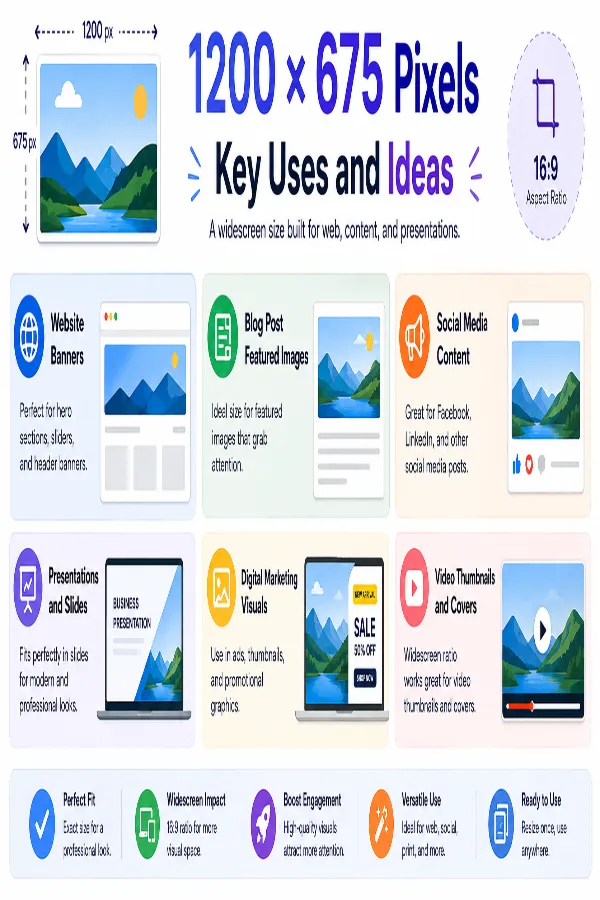
    A 1200 × 675 pixel image has a 16:9 widescreen aspect ratio. It is commonly used for blog featured images, website banners, presentations, digital marketing graphics, social media posts, and other online content.

    How do I resize an image to 1200 × 675 pixels?

    Upload your image, keep the default 1200 × 675 pixel size, or enter custom dimensions if required, choose the resize mode, and adjust the DPI and image quality, then download the resized image. You can also rotate, crop, flip, zoom, or enable lock aspect ratio before saving.

    What is Lock Aspect Ratio?

    Lock Aspect Ratio automatically maintains the original proportions of your image while resizing. When enabled, the width and height stay proportional, helping prevent unwanted stretching or distortion.

    Which resize mode should I choose?

    Use Stretch for exact dimensions, Crop Fit to preserve proportions while filling the frame, or Fixed to keep the entire image visible with optional background padding.

    Can I resize images without losing quality?

    Resizing an image to 1200 × 675 pixels can maintain good visual quality when the original image has enough resolution. Enlarging a smaller image to 1200 × 675 may make fine details or text appear less sharp.

    Does resizing change the file size?

    Yes. The final file size depends on the selected dimensions, image quality, DPI, and output format.

    Can I resize portrait, landscape, and square images?

    Yes. The tool supports all image orientations. Depending on the selected resize mode, your image can be cropped, stretched, or fitted within the widescreen frame.

    Is 1200 × 675 pixels suitable for website featured images?

    1200 × 675 pixels can work well for website featured images when the site's design uses a 16:9 layout. Check the specific image dimensions recommended by your website theme or content management system before publishing.

    Can I use 1200 × 675 pixels for email banners?

    Yes. Many newsletters and email marketing platforms support widescreen banner images. Always check your email platform's recommended dimensions before uploading.

    Can I resize screenshots to 1200 × 675 pixels?

    Yes. Screenshots can be resized for tutorials, documentation, presentations, websites, and educational materials while maintaining a consistent widescreen appearance.

    Can I enlarge a smaller image to 1200 × 675 pixels?

    Yes, but enlarging a low-resolution image may reduce sharpness. A higher-resolution original image generally produces better results.

    Which image format should I choose?

    Choose JPG for photographs, PNG for graphics with transparency, WEBP for optimized web images, and GIF for simple animations.

    Can I print a 1200 × 675 pixel image?

    Yes. At 300 DPI, a 1200 × 675 pixel image prints at approximately 4 × 2.25 inches. Larger print sizes may require a higher-resolution source image.

    Will my image look stretched after resizing?

    Not if you choose the appropriate resize mode. Enabling lock aspect ratio, crop fit, or fixed mode helps preserve natural proportions while fitting the image into the required dimensions.

    Can I use transparent PNG images at 1200 × 675 pixels?

    Yes. PNG images retain their transparent backgrounds after resizing, making them suitable for logos, overlays, presentations, and website graphics.

    Will the original image be modified?

    No. The tool creates a resized copy while leaving your original image unchanged.

    When should I choose 1200 × 675 pixels instead of 1280 × 720 pixels?

    Choose 1200 × 675 pixels when a website, CMS, design template, or marketing platform specifically requires those dimensions. Both resolutions use the same 16:9 aspect ratio, but selecting the exact required size helps avoid unnecessary resizing, compression, or upload warnings.

    Can I resize images for Open Graph (OG) previews?

    Many websites and social platforms display Open Graph images when links are shared. While platforms may recommend different dimensions, 1200 × 675 pixels works well for many widescreen previews and promotional graphics. Always verify the recommended image size for the platform you're publishing to.

    How can I add borders to my image after resizing?

    If you want to create extra spacing around your image without cropping it, use our Image Border Tool to add borders before downloading.

    How do I resize images for blog and social media sharing?

    If you're preparing graphics for articles or social platforms, explore our Social Media Image Resizer to create images optimized for different platforms and layouts.

    What aspect ratio is 1200 × 675 pixels?

    1200 × 675 pixels has a 16:9 aspect ratio. Both numbers can be divided by 75, giving 16 × 9, so the proportions are the same as other 16:9 image sizes.

    Is 1200 × 675 the same as 16:9?

    Yes. A 1200 × 675 image has the same 16:9 proportions because 1200:675 simplifies to 16:9. The numbers 1200 and 675 specify the actual pixel dimensions, while 16:9 describes the aspect ratio.

    How many megapixels is 1200 × 675?

    A 1200 × 675 image contains 810,000 pixels in total. That is approximately 0.81 megapixels.

    What is 1200 × 675 pixels in inches?

    The physical size of a 1200 × 675 pixel image depends on its DPI setting. At 300 DPI, it is approximately 4 × 2.25 inches; at 150 DPI, it is approximately 8 × 4.5 inches.

    Is 1200 × 675 the same as 1280 × 720?

    No. Both 1200 × 675 and 1280 × 720 have a 16:9 aspect ratio, but 1280 × 720 contains more pixels. A 1200 × 675 image has 810,000 pixels, while a 1280 × 720 image has 921,600 pixels.

    Does 1200 × 675 pixels specify the file size?

    No. 1200 × 675 specifies the image dimensions, not the file size. The resulting file size can vary depending on the image content, format, quality setting, compression, and other image properties.

    What happens if my original image is not 16:9?

    A non-16:9 image may need to be cropped, stretched, or fitted with background padding to reach exactly 1200 × 675 pixels. The result depends on whether you choose Crop Fit, Stretch, or Fixed mode.

    What DPI should I use for a 1200 × 675 image?

    The appropriate DPI depends on how the image will be used. For digital use, the pixel dimensions are generally the primary specification, while a higher DPI setting can be relevant when the image is being prepared for physical printing.

    Over 500k Users Rely on Our Image Editing Tools Monthly

    Join a growing community of creators who trust safeimagekit.com for versatile image editing and processing solutions.

    rating-img

    Rate this tool

    Your feedback helps us improve our services

    3.57/5   683 votes

    About The Author

    Taufik Ali

    Taufik has an analytical mindset and great attention to detail. He excels in analyzing website performance, conducting keyword research, optimizing on-page content, and developing effective link-building strategies.

    Contributors