or drop your file here
or drop your file here

This tool instantly analyzes and compares two uploaded faces using advanced facial recognition algorithms. It detects key facial landmarks such as eyes, nose, jawline, and facial proportions to determine similarity. You get quick and reliable comparison results within seconds.

The comparison system uses precision-based AI models to ensure highly accurate face matching results. It minimizes false positives by deeply analyzing facial structure instead of only surface features. This makes it suitable for both casual and semi-professional use.

Images are processed immediately after upload without long wait times. Even high-resolution images are analyzed efficiently without slowing down your browser. This ensures a smooth and seamless user experience.

All uploaded images are handled with strict privacy protection. The tool does not permanently store user images and automatically deletes files after comparison. Your facial data remains secure and confidential at all times.

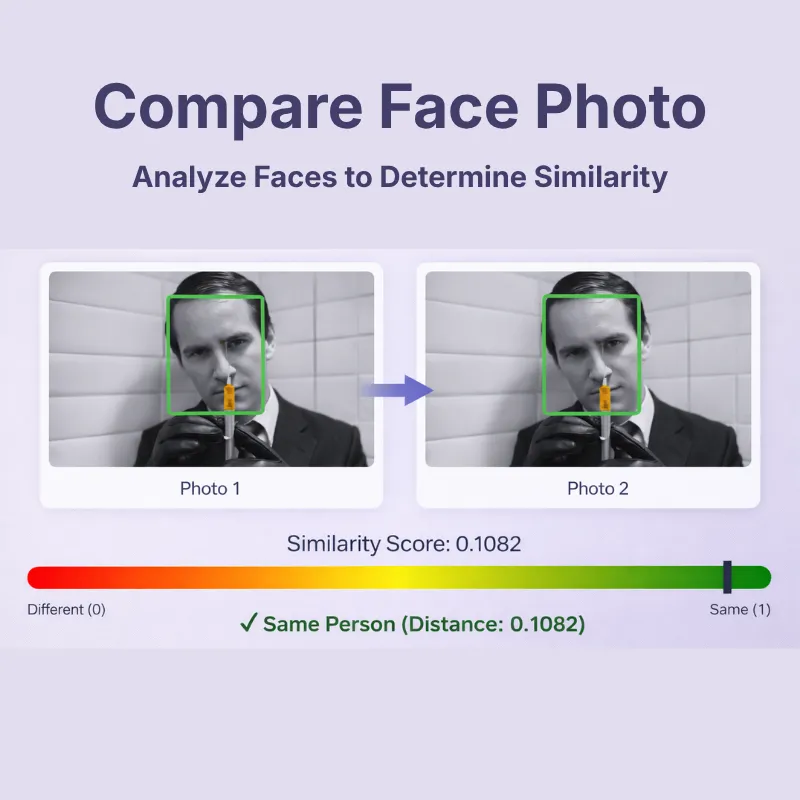
The tool displays both images side by side instantly after upload. This layout provides a clear visual comparison for quick assessment.

The interface is clean, simple, and extremely easy to use even for first-time users. Upload buttons and comparison actions are clearly labeled for effortless navigation. Anyone can compare faces without technical knowledge.
Frequently Asked Questions
An online face comparison tool allows users to upload two different face images and compare their facial structure using artificial intelligence. The system analyzes facial landmarks such as eyes, nose structure, face shape, and symmetry. The tool then generates a similarity result within seconds.
The tool provides high accuracy by using advanced algorithms that analyze multiple facial features rather than relying on a single point. While it is highly reliable for general comparison and identity similarity checks, it should not be used for official legal or forensic verification purposes.
Yes, the tool follows strict data security and privacy measures. Uploaded images are not stored permanently and are automatically removed after processing. This ensures complete confidentiality of your personal facial data.
Yes, the tool supports common image formats such as JPG, JPEG, and PNG. This allows users to upload images taken from mobile phones, digital cameras, and social media platforms. The system automatically processes the supported formats without any extra steps.
Yes, image clarity plays an important role in achieving accurate results. Clear, front-facing images with proper lighting provide much better facial detection and comparison accuracy. Blurry or heavily filtered images may reduce result reliability.
Yes, the face comparison tool is fully optimized for mobile phones and tablets. You can upload images directly from your phone gallery and run comparisons smoothly. No desktop-only software is required.
Yes, the tool is completely free and does not require any subscription or payment. You can perform multiple face comparisons daily without any limitations. It is ideal for both casual and frequent use.
This tool primarily measures facial similarity rather than confirming verified identity. It compares structural features to determine how closely two faces resemble each other. It is not intended for biometric security or law enforcement verification.
Yes, many users enjoy uploading their photos alongside celebrity images to check resemblance. The tool compares facial structure and proportions to determine similarity percentage. This makes it fun for entertainment and social sharing.
No, the tool does not share your uploaded images with any external platforms or advertisers. Everything remains private and is processed securely. Your data is used only to perform the comparison and nothing else.
This tool is best suited for non-official and casual use such as fun comparisons, testing resemblance, or basic checks. It is not recommended as a legally valid identity verification system. Professional authentication requires certified biometric systems.
You can use the comparison tool without needing to register or log in. Users can access the comparison tool without restrictions at any time.
Users can upload images either from their personal devices or through Google Drive and Dropbox cloud storage solutions.
The tool works on all devices, including smartphones, tablets, and desktops, across all major browsers.
The system provides visual overlays or side-by-side images, which display a similarity score that shows the degree of facial resemblance between individuals.
The system can analyze animated GIFs because it processes their animated content, which includes multiple frames that contain facial features for comparison.
The tool automatically adjusts and aligns images for accurate comparison, regardless of size differences.
Yes, the background does not affect the facial analysis. The tool focuses on facial features.
You can easily determine the estimated age of a person using the Face Age Estimator at https://safeimagekit.com/face-age. Upload a face image, and it will analyze and provide an approximate age, which can be useful for various applications like age verification or entertainment.
Visit https://safeimagekit.com/eye-shape-detector to identify and analyze the shape of eyes in facial images. This is useful for biometric analysis, cosmetic planning, or facial recognition projects. Simply upload a face photo to get insights into the eye shape.
Over 500k Users Rely on Our Image Editing Tools Monthly
Join a growing community of creators who trust safeimagekit.com for versatile image editing and processing solutions.